UX Content
  • Case Studies
  • UX Bites
  • Cheatsheets
  • Psychology
BFM+
  • Instant Feedback
  • MCP
  • Figma Plugin
  • Tiers & pricing
  • Free newsletter
  • Log in
Other
  • Archive
  • About
  • Help
  • Changelog
Services
UX audits

A complete audit of your user experience, delivered in a format that you can't ignore.

Book an audit

Built for Mars Ltd is a company registered in England and Wales (Company No. 12731987).

Account
  • Log inAccess your library and activities
  • SubscribeUnlock all features and access to the library
Learn from the best companies in the world

A library of content that even non-designers find interesting.

Subscribe todaySubscribe today
Structured learning
  • UX BootcampEnroll in a 5-week bootcamp
  • PathwaysCreate custom learning Pathways to work towards any goal, industry or topic
  • CollectionsBrowse Case Studies by key topics
  • QuizzesTest your knowledge
Explore the library
  • Case StudiesSlideshows that are packed with research
  • UX BitesReal examples of design magic
  • CheatsheetsQuickly level up in a particular area
  • Product PsychologyLearn the essentials
  • NewsletterGet research straight to your inbox
  • CompaniesBrowse by company
Learn from the best companies in the world

A library of content that even non-designers find interesting.

Subscribe todaySubscribe today
Tools to help you
  • AI InsightsUpload screenshots of your design, and get instant feedback from our AI
  • MCPAccess the entire library from your favourite agent
  • Figma pluginAccess our AI tools, and our entire library, directly from Figma
One-to-one help
  • UX AuditsThe fast-track for growth
Includes tools that help you ship better products

Learning never stops, but sometimes you need a little more.

Subscribe todaySubscribe today
Log inSubscribe today
Home
Company
Google Meets
Google Meets

Google Meets

Video meetings

Google Meet spots in-call problems before they happen, from infinity mirrors to empty calls. Featuring UX Bites on proactive, context-aware prompts.

Key takeaways from 1 Case Study and 7 UX Bites

  • Hides the video overlay on the Chat tab, where it would get in the way

  • A 'Switch here' button reassures you that changing browsers won't interrupt the call

  • A 15-minute warning on free calls prompts a 14-day trial without ending the call

Often uses:

Discomfort & Frustration
Anxiety
Complexity & Understanding
Feature Usage
Conversion Rates

Similar companies:

Communication
Photo & Video
Amo logo
Amo
Medium logo
Medium
ChatGPT logo
ChatGPT
Hubspot logo
Hubspot
Discord logo
Discord
Last updated: 09/10/2026

Real world examples

UX Bite:
Google Meets logoGoogle Meets

Hiding the video when...

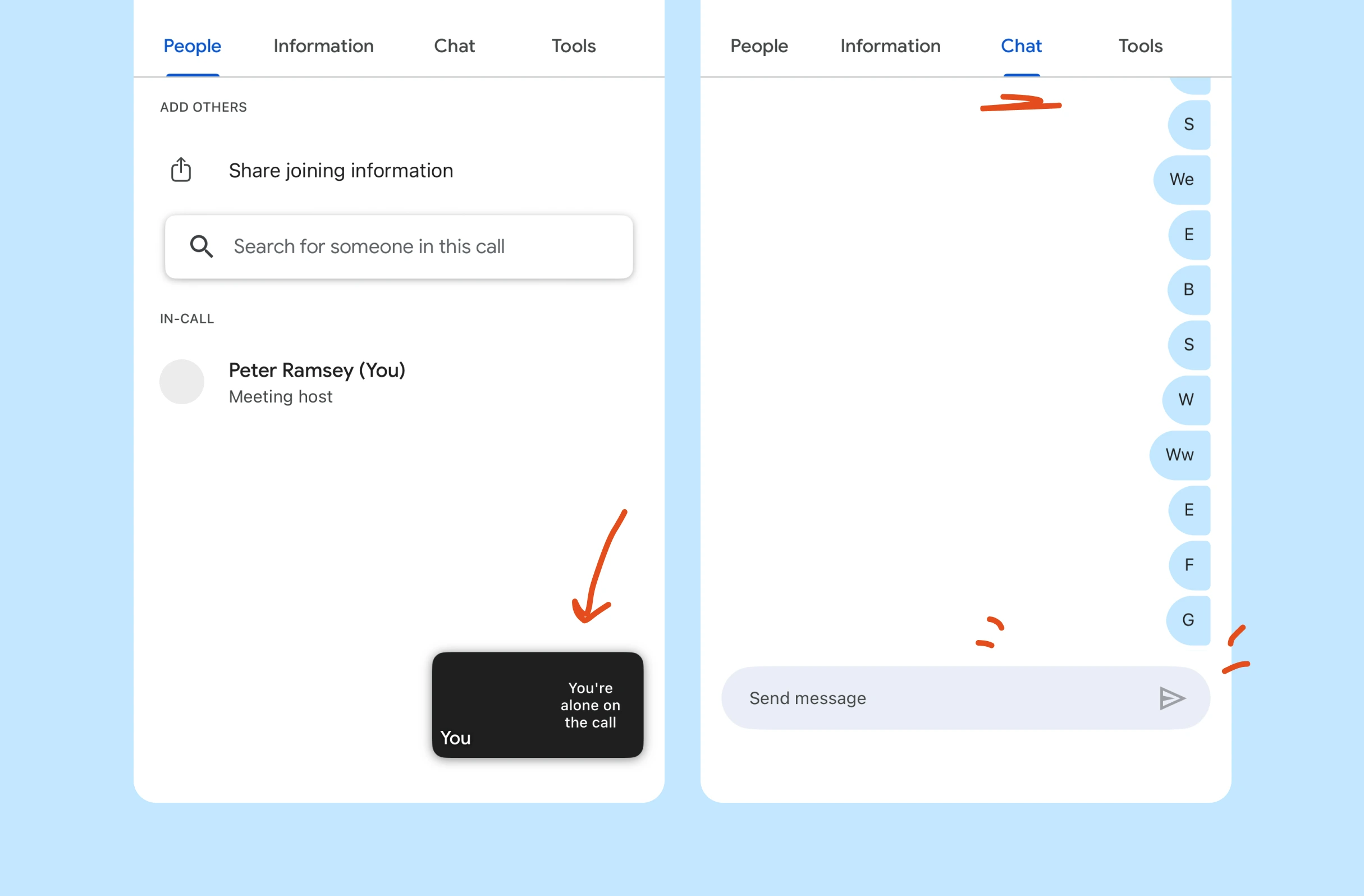
Google Meets will automatically hide the video overlay on the 'Chat' tab, because it would be in the way.

Reduce frustration
Reduce frustration
Video call side panel. On the "People" tab, a floating self-view tile shows "You're alone on the call"; switching to the "Chat" tab hides the tile, freeing space for messages and the "Send message" field.
View UX Bite
UX Bite:
Google Meets logoGoogle Meets

Swapping browsers mid call

Subscribe to unlock this example

Feature usage+ 1 more
Subscribe to unlock
Preview
UX Bite:
Google Meets logoGoogle Meets

Triggering On-The-Go mode

Subscribe to unlock this example

Feature usage+ 2 more
Subscribe to unlock
Preview
UX Bite:
Google Meets logoGoogle Meets

You're alone on this call

Subscribe to unlock this example

Better understanding+ 1 more
Subscribe to unlock
Preview
UX Bite:
Google Meets logoGoogle Meets

Google Meet's infinity mirror

Subscribe to unlock this example

Better understanding+ 1 more
Subscribe to unlock
Preview
UX Bite:
Google Meets logoGoogle Meets

In-call upgrading

Subscribe to unlock this example

Conversion rates+ 1 more
Subscribe to unlock
Preview
UX Bite:
Google Meets logoGoogle Meets

Alert that visitors are on the call

Subscribe to unlock this example

Reduce anxiety
Reduce anxiety
Subscribe to unlock
Preview

UX Case Studies

Case Study:
Zoom logoGoogle Meets logoMicrosoft Teams logo

8 mins

Which is better; Zoom, Teams or Meet?

Zoom large logo
Subscribe to unlock
Preview
Brand logo. A single bold letter "S" on a plain background, with no interface, controls or screen content shown.App icon or splash screen showing the brand's stylised letter "M" logo on its own, with no other interface elements, buttons or text visible.

There are more than 1400 UX Bites like this

Subscribe to BFM+

If features can be coded in minutes, thoughtful design is what wins

  • Unlock the entire library
  • Create custom UX courses
  • Access our AI tools
£8/monthbilled annually
See the benefits
or, wait for the free stuff

Join the free newsletter

Get the free content when it's released, straight to your inbox, no account required

"An exceptional resource for learning how to build habit-forming products that people love."

Author portrait. A smiling speaker wearing a headset microphone, shown alongside the cover of the book "HOOKED: How to Build Habit-Forming Products", used to introduce the author or a feature on habit-forming product design.
Nir EyalAuthor of Hooked

"I’d never met anybody who looks at usability and UX the way I do until I met Peter. Only he’s smarter."

Author portrait. A usability expert is shown with the cover of his book "DON'T MAKE ME THINK revisited", subtitled "A Common Sense Approach to Web and Mobile Usability", a classic reference on intuitive interface design.
Steve KrugAuthor of Don't Make Me Think

"The completest view of the psychological underpinnings of human behaviour that I’ve ever seen."

Profile image. A circular headshot of a smiling man with two overlapping company logo badges, indicating the organisations he is associated with, as used for speaker, testimonial or team member introductions.
Bing GordonKleiner Perkins & EA

"What a nice idea! Christopher Alexander would be proud to see patterns collected like this."

Profile image. A circular headshot of a person with two app icon badges overlapping the corner, linking the person to the apps they're associated with.
DHHHey! & Basecamp