UX Content
  • Case Studies
  • UX Bites
  • Cheatsheets
  • Psychology
BFM+
  • Instant Feedback
  • MCP
  • Figma Plugin
  • Tiers & pricing
  • Free newsletter
  • Log in
Other
  • Archive
  • About
  • Help
  • Changelog
Services
UX audits

A complete audit of your user experience, delivered in a format that you can't ignore.

Book an audit

Built for Mars Ltd is a company registered in England and Wales (Company No. 12731987).

Account
  • Log inAccess your library and activities
  • SubscribeUnlock all features and access to the library
Learn from the best companies in the world

A library of content that even non-designers find interesting.

Subscribe todaySubscribe today
Structured learning
  • UX BootcampEnroll in a 5-week bootcamp
  • PathwaysCreate custom learning Pathways to work towards any goal, industry or topic
  • CollectionsBrowse Case Studies by key topics
  • QuizzesTest your knowledge
Explore the library
  • Case StudiesSlideshows that are packed with research
  • UX BitesReal examples of design magic
  • CheatsheetsQuickly level up in a particular area
  • Product PsychologyLearn the essentials
  • NewsletterGet research straight to your inbox
  • CompaniesBrowse by company
Learn from the best companies in the world

A library of content that even non-designers find interesting.

Subscribe todaySubscribe today
Tools to help you
  • AI InsightsUpload screenshots of your design, and get instant feedback from our AI
  • MCPAccess the entire library from your favourite agent
  • Figma pluginAccess our AI tools, and our entire library, directly from Figma
One-to-one help
  • UX AuditsThe fast-track for growth
Includes tools that help you ship better products

Learning never stops, but sometimes you need a little more.

Subscribe todaySubscribe today
Log inSubscribe today
Home
UX Glossary
Knowledge Gap

🚧

Knowledge Gap

The difference between the information that the user knows, and what they need to know to efficiently use the product or service.

Similar psychology:

Tribalism
Curiosity Gap
User Delight

Likely impacts:

Attention & Interest
Effort & Motivation
Complexity & Understanding
Churn
Last updated: 26/09/2026

How to utilise this in your designs

If a search returns nothing, you could use the empty state to explain what the feature can and can't do, closing the knowledge gap rather than showing 'no results'.

Search screen: title "Search", back arrow, query "How much am I spending on software?". Message: "Sorry, we couldn't find anything with that name or category." Underlined blue "How to use this search" circled in orange; orange arrow points to right modal listing "Things you can search for" and "Things you can't search for yet".
Example from
Starling logo
Starling

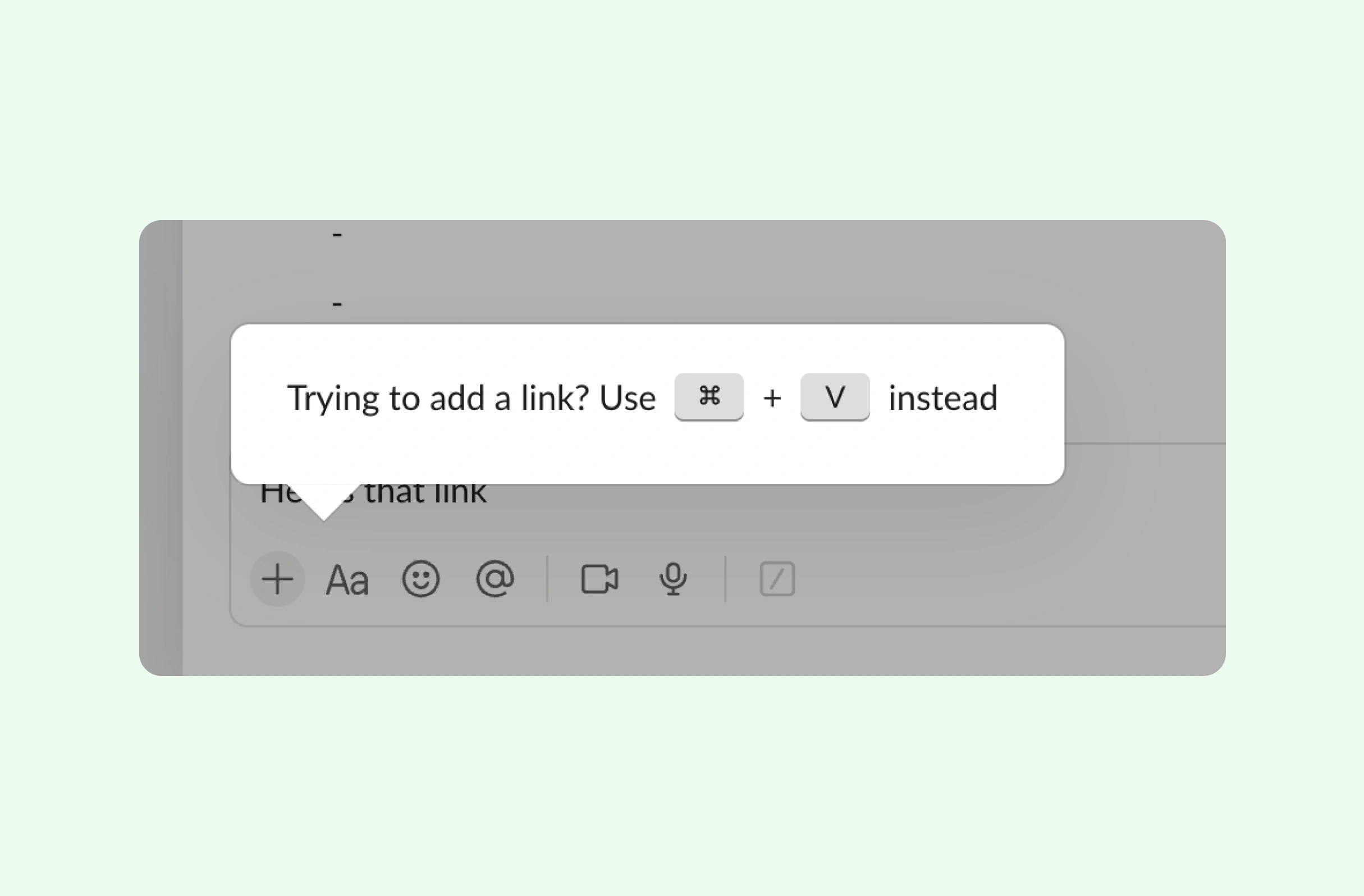
Where a shortcut breaks a familiar convention, you could show a tooltip when users press the old shortcut, filling that specific knowledge gap in the moment.

Slack message input UI with toolbar icons (plus, Aa, emoji, @, video, mic). Tooltip prompt says "Trying to add a link? Use ⌘ + V instead".
Example from
Slack logo
Slack

After a vague prompt, you could experiment with teaching users how to refine the result once it's generated, filling the knowledge gap while they're viewing the output.

Teaching you in the moment
Example from
Google logo
Google

When a query is slow to load, you could try using the wait to teach ways to speed up results, turning a frustrating pause into a chance to close a knowledge gap.

Loading bar in orange showing query progress with text "Reticulating spines" crossed out to "spines...". Suggestion box advises reducing date range and enabling 10% sampling.
Example from
Posthog logo
Posthog

When users self-rate their skill level, you could show example equations for each bracket, so a knowledge gap about the options doesn't lead to a poor choice.

Math comfort level UI with progress bar, back arrow, question prompt, and four selectable boxes: Arithmetic Introductory, Pre-Algebra Foundational, Algebra Intermediate, Calculus Advanced.
Example from
Brilliant logo
Brilliant

Possible impacts

Teaching users at the exact moment it's relevant could hold their attention for longer, as filling a knowledge gap in context feels useful rather than like a lecture.

As seen in:
Google logo
Google
Teaching you in the moment

Framing a knowledge gap as an open question might motivate users to keep going, though too large a gap could backfire and simply feel confusing.

As seen in:
Sunlitt logo
Sunlitt
Showing off their 3D modeling
Letaido logo
Letaido
Try it without connecting your tools

Explaining how things work where users lack knowledge could reduce perceived complexity, helping users become efficient with the product sooner.

As seen in:
Starling logo
Starling
A better empty state
Slack logo
Slack
Onboarding incorrect shortcuts

Filling knowledge gaps with timely onboarding and in-product education could reduce churn, as users left confused about how things work often give up.

As seen in:
Sunlitt logo
Sunlitt
Showing off their 3D modeling
Tiimo logo
Tiimo
Helping you rearrange your day
Peter Ramsey, Built for Mars Founder

Written by Peter Ramsey

Consultant to 100+ companies

Published: 29/07/2023